
Working from home demands reliable communication. A top-tier cordless phone system can significantly enhance productivity and professional image, offering seamless connectivity and essential features. This guide explores the best cordless phone systems for home offices, considering factors such as range, clarity, and advanced functionalities to help you select the perfect system for your needs.
From understanding the nuances of DECT 6.0 technology to navigating the complexities of setup and connectivity, we’ll delve into the key features and considerations that distinguish a good system from a great one. We’ll also examine the importance of security and longevity, ensuring you make an informed decision that benefits your home office for years to come.
Introduction to Cordless Phone Systems for Home Offices
The rise of the home office has significantly impacted communication needs. A reliable and versatile phone system is crucial for maintaining productivity and professional connections. Cordless phone systems offer a compelling solution, providing mobility and flexibility within the home office environment while maintaining a professional image. They offer a convenient alternative to traditional landlines, eliminating the constraints of being tethered to a desk.Cordless phones offer several advantages for home office users.
The ability to move freely around the house while taking calls enhances productivity and allows for multitasking. This mobility is particularly beneficial for those who need to manage household responsibilities alongside their work. Furthermore, many modern cordless systems offer advanced features such as caller ID, call waiting, and voicemail, mirroring the functionality of more sophisticated office phone systems.
This ensures seamless communication and professional management of calls, even in a home setting.
Types of Cordless Phone Systems
Cordless phone systems are broadly categorized based on their underlying technology. The two most prevalent types are DECT 6.0 and analog systems. DECT 6.0 (Digital Enhanced Cordless Telecommunications) systems utilize digital signals for transmission, resulting in superior sound quality, enhanced security through encryption, and reduced interference. Analog systems, on the other hand, use analog signals, which are more susceptible to interference and offer generally lower sound quality.
While analog systems are often more affordable, DECT 6.0 systems provide a significantly improved user experience, particularly in areas with potential interference from other electronic devices.
A Brief History of Cordless Phone Technology
The evolution of cordless phone technology for home use reflects broader technological advancements in communication. Early cordless phones, introduced in the 1980s, were often bulky and suffered from limited range and poor sound quality due to their analog technology and limited frequency bands. These early models primarily served as a convenience, offering a limited degree of mobility. The development of DECT technology in the 1990s marked a significant turning point.
DECT offered superior range, improved sound quality, and reduced interference, paving the way for more sophisticated and reliable cordless phone systems. Subsequent advancements in DECT technology, such as DECT 6.0, have further enhanced features and capabilities, including enhanced security and increased range, making them a highly suitable option for modern home offices. The ongoing integration of digital technologies and the increasing demand for better communication solutions continues to drive innovation in the cordless phone market.
Key Features to Consider When Choosing a Cordless Phone System
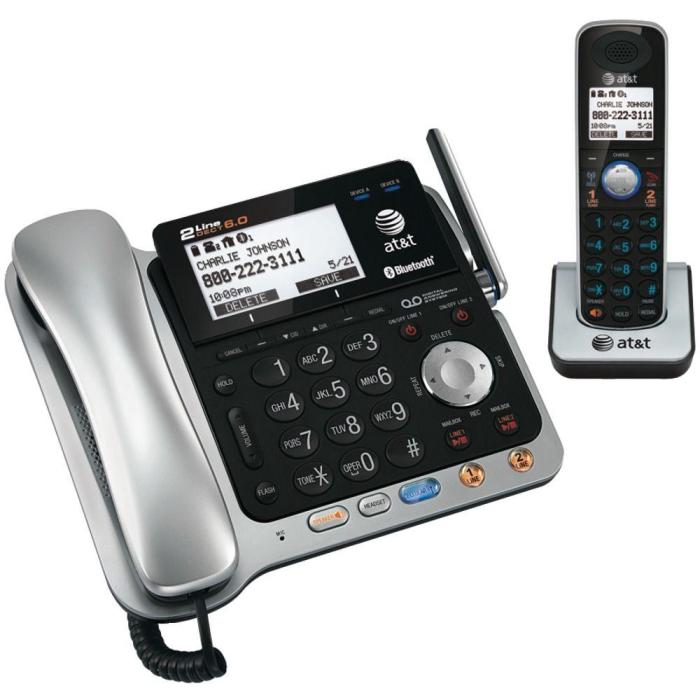
Selecting the right cordless phone system for your home office requires careful consideration of several key features. The ideal system will enhance productivity and communication, seamlessly integrating into your workspace without causing frustration. The following sections detail crucial aspects to evaluate before making a purchase.
Range and Clarity
In a home office setting, the range of your cordless phone is paramount. A weak signal can lead to dropped calls and frustrating interruptions, especially if you frequently move around your workspace or have a larger home office. Similarly, clear audio is essential for productive conversations. Background noise reduction and high-quality speakers contribute significantly to call clarity, ensuring you can hear and be heard clearly, even in slightly noisy environments.
A longer range and superior clarity minimize disruptions and improve overall communication efficiency. Consider the size of your home and the typical distance between the base unit and where you’ll be using the handset.
Caller ID, Call Waiting, and Voicemail
These features are fundamental for managing calls effectively. Caller ID allows you to see who’s calling before answering, helping you prioritize important calls and avoid unwanted interruptions. Call waiting lets you know when another call is coming in while you’re already on the phone, enabling you to manage multiple calls efficiently. Voicemail provides a convenient way to capture messages when you’re unavailable, ensuring you don’t miss important communications.
These combined features contribute to improved communication management and reduced missed calls.
Headset Compatibility and Hands-Free Operation
For many home office professionals, headset compatibility is a highly desirable feature. Using a headset allows for multitasking, enabling you to work on your computer while taking calls without holding the phone. Hands-free operation, often integrated with speakerphone functionality, offers a similar advantage, allowing for more flexible call management. This frees up your hands for note-taking, typing, or other tasks, boosting productivity and making calls more convenient.
The comfort and quality of the headset should also be considered for extended use.
Comparison of Top-Rated Models
| Model Name | Range (ft) | Features | Price (USD) |
|---|---|---|---|
| Panasonic KX-TGE274S | 500 (approx.) | Caller ID, Call Waiting, Voicemail, Headset Jack, Speakerphone | $60 – $80 |
| VTech DS6521-3 | 500 (approx.) | Caller ID/Call Waiting, Expandable to 5 Handsets, Digital Answering System | $70 – $90 |
| AT&T CL82425 | 300 (approx.) | Caller ID/Call Waiting, Answering System, Hearing Aid Compatible | $50 – $70 |
| Gigaset A540 | 500 (approx.) | Caller ID, Call Waiting, Voicemail, Bluetooth, Hands-free Speakerphone | $100 – $120 |
Top-Rated Cordless Phone Systems
Choosing the right cordless phone system for your home office can significantly impact productivity and communication efficiency. A reliable system offers clear audio, convenient features, and seamless integration into your workspace. This section details three top-rated systems, examining their design, performance, and user experience based on user reviews and expert analysis.
Panasonic KX-TGE274M Expandable Digital Cordless Phone System
The Panasonic KX-TGE274M is a popular choice known for its robust features and reliable performance. Its design is sleek and modern, fitting seamlessly into most home office environments. The handset is comfortable to hold and the base unit is compact. Performance-wise, the system consistently delivers clear audio, even in areas with potential interference. Callers report minimal static or dropped calls.
The user experience is generally positive, with many users praising the ease of setup and intuitive interface. The system’s expandable nature is a significant advantage, allowing you to add handsets as needed.
- Pros: Expandable system, clear audio quality, user-friendly interface, reliable performance, sleek design.
- Cons: Some users report the range could be slightly better in larger homes, the answering machine functionality could be improved.
VTech DS6521-3 DECT 6.0 Expandable Cordless Phone System
The VTech DS6521-3 is another strong contender in the cordless phone market. This system is praised for its long range and excellent clarity. The design is functional and straightforward, prioritizing performance over flashy aesthetics. The handsets are ergonomically designed for comfortable extended use. The system’s performance is consistently high, with users reporting crystal-clear audio and a reliable connection, even at the furthest reaches of the range.
The user experience is largely positive, with users appreciating the simplicity of the interface and the ease of setting up additional handsets. However, some users find the answering machine’s features somewhat basic compared to more advanced models.
- Pros: Excellent range, crystal-clear audio, easy setup, comfortable handsets, expandable.
- Cons: Answering machine features are relatively basic, design is somewhat uninspired.
AT&T CL82425 DECT 6.0 Cordless Phone with Answering System
The AT&T CL82425 offers a balance of features and affordability. Its design is simple yet functional, with a focus on ease of use. The handset is lightweight and comfortable to hold. While the audio quality is generally good, some users report a slight reduction in clarity at the furthest range. However, for most home offices, the range is sufficient.
The user experience is positive for its simplicity. The answering machine is easy to operate, and the phone’s features are straightforward and intuitive. This model is a good option for users who prioritize value and ease of use over advanced features.
- Pros: Affordable, user-friendly interface, simple design, reliable performance for most home offices.
- Cons: Audio quality might slightly degrade at maximum range, fewer advanced features compared to other models.
Connectivity and Setup
Setting up your cordless phone system correctly is crucial for ensuring reliable communication. Understanding the different connectivity options and the setup process for each will help you avoid potential issues and maximize your system’s functionality. This section will detail the various connection types and provide step-by-step guidance for a smooth setup.Different cordless phone systems offer varying connectivity options, primarily analog and digital.
Analog phones connect directly to your existing landline phone jack, while digital phones often require a connection to your internet router via a DECT (Digital Enhanced Cordless Telecommunications) system or a compatible VoIP (Voice over Internet Protocol) adapter. The choice depends on your existing infrastructure and communication needs.
Analog Phone System Connection
Analog cordless phone systems connect directly to your home’s existing telephone line. This is a simple and straightforward setup, generally requiring only a single connection.
- Locate the phone jack in your home office.
- Plug the base station’s power adapter into a nearby electrical outlet.
- Connect the phone line cord from the wall jack to the designated port on the base station. This is usually clearly labeled.
- Power on the base station and follow the on-screen prompts or instructions in the user manual to register the handset(s).
Digital Phone System Connection
Digital cordless phone systems offer advanced features and can often connect to your internet router for broader functionality. This setup might involve more steps depending on the specific system and its capabilities.
- Connect the base station to your router using an Ethernet cable, if required by your system. Some systems use DECT technology and do not require a wired connection to the router.
- Plug the base station’s power adapter into a nearby electrical outlet.
- Power on the base station and follow the on-screen prompts or instructions in the user manual to configure the internet connection and register the handset(s). This usually involves inputting your Wi-Fi network name and password.
- For VoIP systems, you will also need to configure your VoIP account details within the phone’s settings menu.
Troubleshooting Connectivity Issues
Connectivity problems can arise with any system. Understanding common issues and their solutions will help you quickly restore service.
- Check all connections: Ensure the power cord is securely plugged into both the base station and the wall outlet. Verify that the phone line cord (for analog systems) or Ethernet cable (for digital systems) is firmly connected to both the base station and the wall jack or router respectively.
- Power cycle the devices: Unplug the power adapter from both the base station and the router (if applicable) for at least 30 seconds. Then, plug them back in and allow them to fully restart.
- Check the phone line (for analog systems): Ensure that the phone line is functioning correctly by testing it with a different phone. If the line is faulty, contact your telephone service provider.
- Verify internet connectivity (for digital systems): Ensure your internet connection is stable and working correctly by testing it on other devices. If there are internet connectivity issues, contact your internet service provider.
- Consult the user manual: Your cordless phone system’s user manual provides detailed troubleshooting steps and may offer solutions specific to your model.
Advanced Features and Integrations
Many modern cordless phone systems offer more than just basic calling functionality. These advanced features significantly enhance their utility, particularly within a busy home office environment, improving efficiency and communication. Integrating these systems with other smart home technologies further streamlines workflows and creates a more connected workspace.Advanced features such as conference calling, robust answering machine capabilities, and intercom functionality can greatly improve productivity and communication flow within a home office setting.
Furthermore, the integration of cordless phones with smart assistants and other smart home devices offers significant convenience and automation benefits. The following sections will explore these advanced features and integrations in detail, comparing and contrasting their implementation across different models.
Conference Calling Capabilities
Conference calling allows multiple participants to join a single call, facilitating efficient meetings and collaborations. High-quality audio and ease of use are critical aspects to consider. Some models offer dedicated conference call buttons for quick access, while others rely on software-based solutions. For example, the Panasonic KX-TG7875 offers a three-way conferencing feature, ideal for quick briefings or small team discussions.
More advanced systems may support even larger conference calls, though these are less common in home office setups. The audio quality during these calls varies between models, with some offering clearer audio than others, a crucial factor for professional use.
Intercom Functionality
Internal communication within a home office can be streamlined using the intercom feature available on some cordless phone systems. This allows for quick and easy communication between different handsets within the system without needing to dial a number. This feature is particularly useful in larger homes or for families working from home, enabling efficient coordination and communication. For instance, a parent could use the intercom to quickly contact a child in another room without disrupting ongoing calls.
The range and clarity of the intercom feature can vary significantly between models, so careful consideration of this aspect is important.
Answering Machine Features
Modern answering machines integrated into cordless phone systems go beyond simple message recording. Many offer features such as remote access to messages, digital recording for clearer audio, and the ability to screen calls before answering. The storage capacity of these answering machines varies widely. Some models offer only a limited number of minutes of recording, while others provide considerably more storage.
The convenience of remote message retrieval is particularly valuable for those who frequently work away from their home office. For example, checking messages remotely via a smartphone app can help ensure no important calls are missed.
Smart Home Integrations
The integration of cordless phone systems with smart home ecosystems is a rapidly developing area. Some models offer compatibility with popular smart assistants such as Amazon Alexa or Google Assistant, enabling voice control of certain phone functions, such as placing calls or checking messages. This integration enhances the overall smart home experience, providing a more seamless and convenient way to manage communication within the home office.
The level of integration varies considerably; some systems may only offer basic voice commands, while others may offer more advanced features such as the ability to control other smart home devices using voice commands through the phone.
Electronic Telephone Systems
Cordless phones are a convenient and common solution for home offices, but they represent only a small segment of the broader world of electronic telephone systems. Understanding the wider landscape can help you choose the best system for your needs, whether it’s a small home office or a large enterprise. This section explores various electronic telephone systems, comparing their features, costs, and scalability.
Electronic telephone systems encompass a range of technologies designed to facilitate voice communication. These systems go beyond the simple functionality of a cordless phone, offering advanced features and greater scalability to accommodate varying communication demands. The choice between different systems depends heavily on factors like budget, the number of users, and the desired level of functionality.
Types of Electronic Telephone Systems
Electronic telephone systems can be broadly categorized into several types, each with its own strengths and weaknesses. Key examples include Private Branch Exchange (PBX) systems and Voice over Internet Protocol (VoIP) systems. PBX systems are traditional, on-premises systems that manage internal and external calls within an organization. VoIP systems, on the other hand, utilize internet connectivity to route calls, offering flexibility and cost savings in many cases.
Other less common but still relevant systems include Key Telephone Systems (KTS), which are simpler, smaller-scale versions of PBX systems, often used in smaller offices.
Comparison of Electronic Telephone Systems
The following table compares cordless phone systems with other electronic telephone system options across key factors:
| System Type | Cost | Scalability | Features |
|---|---|---|---|
| Cordless Phone System | Low to Moderate | Low | Basic call handling, answering machine, possibly caller ID |
| Key Telephone System (KTS) | Moderate | Moderate | Multiple lines, call transfer, hold, intercom |
| Private Branch Exchange (PBX) | High | High | Extensive call management features, voicemail, conferencing, integration with other systems |
| VoIP System | Variable (can be lower than PBX) | High | Wide range of features similar to PBX, often including unified communications, mobility options |
Note that the cost of each system type can vary significantly based on the specific features, number of users, and vendor. Scalability refers to the ease with which the system can be expanded to accommodate more users or features.
Factors Affecting Performance and Lifespan
The performance and longevity of your cordless phone system are influenced by a variety of factors, ranging from environmental interference to the quality of the components and the care you provide. Understanding these factors allows for informed purchasing decisions and contributes to maximizing the system’s useful life. This section details these influential elements and provides practical maintenance advice.Understanding these factors is crucial for both maximizing performance and extending the lifespan of your cordless phone system.
Poor performance can stem from several sources, while diligent maintenance significantly reduces the likelihood of premature failure.
Interference and Signal Strength
Electromagnetic interference (EMI) from other electronic devices, such as microwaves, Wi-Fi routers, and even some fluorescent lights, can significantly impact the signal strength of your cordless phone. This interference can manifest as dropped calls, static, or poor audio quality. The distance between the handset and the base station also plays a critical role. A greater distance often leads to weaker signals and increased susceptibility to interference.
Physical obstructions, such as thick walls or metal objects, can further attenuate the signal. Optimizing placement of the base station, minimizing proximity to potential sources of EMI, and choosing a system with a strong signal strength are key strategies to mitigate these issues.
Battery Life and Charging Habits
The lifespan of the handset’s battery is a major factor influencing the overall user experience. Frequent charging cycles, especially with rapid chargers, can lead to faster degradation of the battery’s capacity over time. Leaving the handset on the charger constantly, even after it’s fully charged, can also negatively impact battery health. Conversely, consistently allowing the battery to fully discharge before recharging can also shorten its lifespan.
Employing moderate charging practices, avoiding extreme temperatures, and using the manufacturer-recommended charger will contribute to maximizing battery longevity.
Environmental Factors
Extreme temperatures, both high and low, can negatively affect the performance and lifespan of cordless phone systems. Exposure to direct sunlight or high humidity can degrade internal components and potentially damage the battery. Similarly, extremely cold temperatures can reduce battery performance and affect the handset’s functionality. Keeping the phone system within a moderate temperature range and away from direct sunlight or moisture is crucial for maintaining optimal performance.
Dust and debris can also accumulate within the handset and base station, potentially affecting functionality. Regular cleaning, using a soft, dry cloth, can help prevent this.
Maintenance and Care Tips
Proper maintenance significantly extends the lifespan of your cordless phone system. Here are some practical tips:
- Keep the base station and handsets away from direct sunlight, excessive heat, and moisture.
- Regularly clean the handsets and base station with a soft, dry cloth to remove dust and debris.
- Avoid dropping or impacting the handsets or base station.
- Use the manufacturer-recommended charger and avoid overcharging or completely depleting the battery.
- Keep the base station in a central location to optimize signal strength and minimize interference.
- Periodically check for software updates from the manufacturer.
- If experiencing persistent problems, consult the user manual or contact the manufacturer’s customer support.
Security Considerations
While cordless phone systems offer convenience, they also present potential security vulnerabilities. Understanding these risks and implementing appropriate safeguards is crucial to protecting your privacy and sensitive information. This section will Artikel common threats and provide practical steps to enhance the security of your home office phone system.Protecting your cordless phone system involves a multi-faceted approach, addressing both the physical and digital aspects of its security.
Failing to do so could expose you to various threats, ranging from eavesdropping to unauthorized access and data breaches. Simple measures, however, can significantly mitigate these risks.
Password Protection and Access Control
Strong passwords are fundamental to securing any system, and cordless phones are no exception. Many modern systems allow for password protection to prevent unauthorized access to features like call logs, voicemail, and settings. Choosing a complex password, incorporating uppercase and lowercase letters, numbers, and symbols, significantly reduces the likelihood of unauthorized access. Regularly changing passwords further strengthens security.
Beyond passwords, some systems offer additional layers of access control, such as PIN codes for specific functions or user profiles with different permission levels. Implementing these features can effectively limit access to sensitive information.
Encryption and Secure Communication
While many cordless phones use digital transmission, not all offer end-to-end encryption. This means that conversations could potentially be intercepted by unauthorized individuals with the right equipment. When purchasing a cordless phone system, look for models that advertise robust encryption protocols to protect the confidentiality of your calls. Understanding the encryption methods employed by the system is vital in assessing its security level.
Consider systems that use advanced encryption standards (AES) for optimal security. Additionally, avoid using cordless phones in areas with high levels of radio frequency interference, as this can weaken the signal and potentially make interception easier.
Physical Security Measures
Beyond digital security, the physical security of your cordless phone system is also important. Storing the base unit in a secure location, away from potential tampering, helps deter theft and unauthorized access. Similarly, keeping the handset secure when not in use minimizes the risk of theft or unauthorized use. For high-security environments, consider securing the base unit to a surface, using a cable lock or other physical deterrent.
Regularly inspect the equipment for any signs of tampering or damage. This proactive approach contributes to the overall security posture of the system.
Protecting Sensitive Information
Never discuss sensitive financial information, medical details, or other confidential data over a cordless phone unless the system offers robust encryption. Even with encryption, it is always prudent to exercise caution when discussing sensitive topics. If such conversations are unavoidable, consider using alternative, more secure communication methods such as a landline with enhanced security features or encrypted messaging applications.
Remember that cordless phones, even with security measures in place, are not inherently secure for highly sensitive communications.
Ultimately, choosing the right cordless phone system for your home office hinges on careful consideration of your specific needs and preferences. By weighing factors such as range, features, and security, you can confidently select a system that enhances productivity, streamlines communication, and contributes to a more efficient and professional home workspace. This guide aims to equip you with the knowledge to make a well-informed decision, ensuring your home office remains connected and productive.
Q&A
What is DECT 6.0 technology and why is it important?
DECT 6.0 is a digital cordless phone technology known for its superior range, clarity, and security compared to analog systems. It offers better protection against eavesdropping and interference.
How far does the range of a cordless phone typically extend?
The range varies greatly depending on the model and environmental factors. However, most high-quality cordless phones offer a range of at least 50-100 feet indoors and potentially more outdoors with clear line of sight.
Can I use a cordless phone with my existing internet service?
Most cordless phones use a traditional analog phone line connection. However, some models offer VoIP (Voice over Internet Protocol) capabilities, allowing you to make calls over your internet connection.
What is the average lifespan of a cordless phone system?
With proper care and maintenance, a high-quality cordless phone system can last for several years. However, technological advancements may lead you to upgrade sooner.


