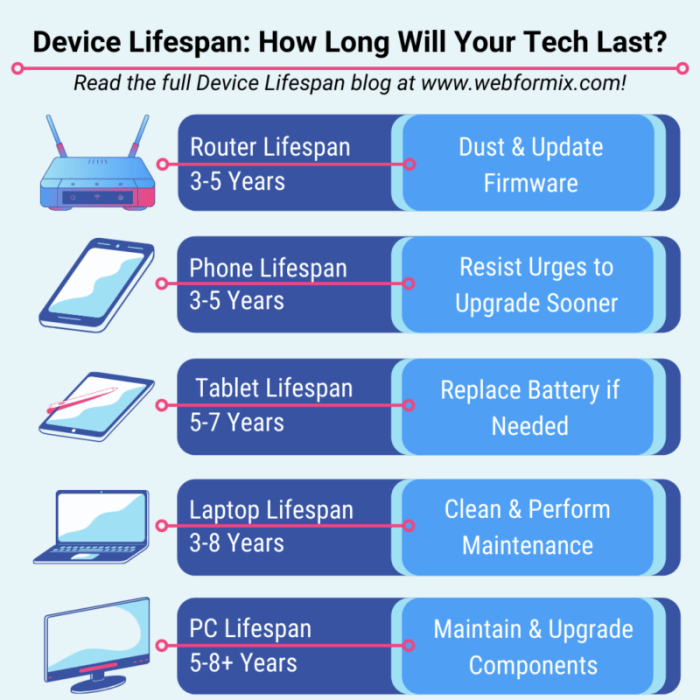
In today’s digital age, our electronic devices are indispensable tools, woven into the fabric of our daily lives. From smartphones and laptops to tablets and smart home systems, these devices represent significant investments, both financially and in terms of convenience. However, their lifespan isn’t infinite. Understanding how to properly care for and maintain these devices is crucial to maximizing their longevity and minimizing the need for frequent replacements.
This guide provides practical strategies to extend the life of your electronics, saving you money and reducing electronic waste.
By following the simple yet effective techniques Artikeld here, you can significantly improve the performance and durability of your devices, ensuring they remain reliable companions for years to come. We’ll explore everything from proper handling and storage to software optimization and preventative maintenance, empowering you to make informed choices that protect your investment and contribute to a more sustainable technological future.
Proper Handling and Storage
Proper handling and storage are crucial for extending the lifespan of your electronic devices. Neglecting these aspects can lead to premature failure due to physical damage, malfunction, or data loss. By following best practices, you can significantly increase the longevity and reliability of your valuable technology.
Careful handling minimizes the risk of accidental drops, impacts, and exposure to harmful environmental factors. Equally important is appropriate storage when devices are not in use, protecting them from damage and ensuring their readiness for future use. This section details the best practices for both handling and storage.
Environmental Factors and Device Lifespan
Environmental conditions significantly impact the lifespan of electronic devices. Exposure to extreme temperatures, high humidity, and excessive dust can accelerate wear and tear, leading to component failure and reduced performance.
| Environmental Factor | Impact on Device Lifespan | Example |
|---|---|---|
| High Temperature | Causes internal component degradation, potentially leading to overheating, malfunctions, and battery failure. | Leaving a phone in a hot car can damage its battery and internal circuitry. |
| Low Temperature | Can cause battery performance to decrease significantly and potentially damage LCD screens. In extreme cases, components can crack. | Leaving a laptop in an unheated garage during winter can lead to battery issues and screen damage. |
| High Humidity | Increases the risk of corrosion and short circuits within the device, leading to malfunction and eventual failure. | Storing electronics in a damp basement can cause internal corrosion and damage. |
| Dust and Debris | Can clog cooling vents, leading to overheating and component damage. Dust can also cause mechanical failure in moving parts. | Accumulated dust in a laptop’s cooling fan can lead to overheating and system crashes. |
Safe Storage of Electronic Devices
Proper storage safeguards your devices from damage and ensures their optimal functionality. The following steps Artikel a safe and effective storage procedure.
Before storing any device, ensure it’s clean and free from dust or debris. A soft, slightly damp (not wet) microfiber cloth is ideal for cleaning. Avoid using harsh chemicals or abrasive materials.
- Power Down Completely: Fully power off your device before storage to prevent accidental damage from power surges or unexpected activation.
- Disconnect All Cables and Accessories: Remove all charging cables, external drives, and other connected devices. This prevents potential damage to ports and connections.
- Clean the Device: Gently wipe down the device’s exterior with a soft, dry cloth to remove dust and fingerprints.
- Choose Appropriate Storage Location: Select a cool, dry, and well-ventilated area. Avoid places with direct sunlight, extreme temperatures, or high humidity.
- Use Protective Packaging: Store the device in its original packaging or a suitable alternative, such as a protective case or padded bag. This cushions the device and protects it from impacts and scratches.
- Consider Environmental Protection: For long-term storage, consider using silica gel packets to absorb moisture and prevent corrosion. These packets are often included with electronics to begin with.
Software Maintenance and Updates
Regular software maintenance is crucial for extending the lifespan of your electronic devices. Neglecting updates and proper software management can lead to decreased performance, security vulnerabilities, and ultimately, premature device failure. This section will detail the importance of software updates and provide strategies for optimizing your device’s software environment.Keeping your operating system and applications up-to-date is essential for both performance and security.
Updates often include bug fixes, performance improvements, and crucial security patches that protect your device from malware and cyber threats. Failing to update leaves your device vulnerable to exploits, potentially leading to data breaches, system crashes, and even complete device compromise. For example, outdated antivirus software might fail to recognize and neutralize newly emerging viruses, leaving your system exposed.
Similarly, an outdated operating system might contain security flaws that hackers can exploit to gain unauthorized access to your personal information.
Operating System and Application Updates
Regular updates introduce improvements to system stability and efficiency. These improvements can range from minor bug fixes that resolve irritating glitches to major performance enhancements that significantly speed up your device. Security patches are arguably the most important aspect of updates. They address known vulnerabilities that could be exploited by malicious actors to steal data, install malware, or even take control of your device.
A good example is the regular release of security updates by operating systems like Windows and macOS to patch vulnerabilities discovered in their core components. These updates are often automatically downloaded and installed, but it’s advisable to manually check for updates periodically to ensure you have the latest security protections. Delaying updates increases the risk of exposure to threats, making your device more susceptible to attacks.
Unused Application Removal and Cache Clearing
Uninstall unused applications and regularly clear your device’s cache memory to optimize performance. Unused applications consume storage space and can sometimes run background processes, consuming system resources and reducing battery life. Clearing the cache, which stores temporary files, helps free up space and improve the speed of applications. Several methods exist for optimizing software performance, each with its own strengths and weaknesses.
Software Optimization Methods
A variety of techniques can be used to enhance software performance. Manually uninstalling unused apps is a straightforward approach, offering a clear improvement in storage space. Most operating systems provide built-in tools to manage applications and uninstall them completely. Alternatively, you can use third-party optimization tools, which often automate the process of identifying and removing unnecessary files and applications.
These tools, however, require careful selection to avoid installing potentially harmful software. Regularly clearing the cache memory is another effective technique. Many apps have built-in cache clearing functions, while operating systems also offer tools to clear system-wide cache. Finally, disabling unnecessary startup applications can reduce the load on your system at boot time and improve overall performance.
A balanced approach combining these methods usually yields the best results.
Battery Care and Management
Proper battery care significantly extends the lifespan of your electronic devices. Understanding your battery type and its specific needs is crucial for maximizing its performance and longevity. Neglecting battery health can lead to premature failure and necessitate costly replacements. This section will detail best practices for various battery types and highlight the detrimental effects of improper handling.
Maintaining optimal battery health involves a multifaceted approach encompassing charging habits, environmental considerations, and awareness of the battery’s limitations. By implementing these strategies, you can significantly extend the lifespan of your devices and avoid unexpected battery-related issues.
Battery Charging Best Practices
Different battery chemistries require different charging approaches. Failing to follow these guidelines can lead to reduced capacity and shortened lifespan. The following table summarizes best practices for common battery types:
| Battery Type | Charging Recommendations | Avoid |
|---|---|---|
| Lithium-ion (Li-ion) | Use the manufacturer’s charger. Avoid fully depleting the battery before charging. Top-up charging (small, frequent charges) is generally preferable to deep discharges. | Deep discharges, leaving the battery fully charged for extended periods (“overcharging”), using third-party chargers without proper certifications. Extreme temperatures during charging. |
| Nickel-Cadmium (NiCd) | Utilize a trickle charger. Periodically perform a “deep discharge” cycle (fully depleting and then fully charging the battery) to prevent the “memory effect.” | Leaving the battery partially charged for extended periods. Overcharging can lead to heat buildup and damage. |
Effects of Extreme Temperatures and Overcharging
Exposure to extreme temperatures and overcharging are major contributors to battery degradation. Both high and low temperatures can significantly reduce battery capacity and lifespan. Overcharging stresses the battery cells, leading to increased heat generation and potential damage.
Imagine a lithium-ion battery left in a hot car on a summer day. The intense heat accelerates chemical reactions within the battery, causing it to degrade faster and potentially leading to swelling or even fire. Conversely, leaving a battery in a freezing cold environment can hinder its ability to function properly, reducing its capacity and potentially causing irreversible damage.
Overcharging, on the other hand, forces the battery to absorb more energy than it can handle. This excess energy generates heat, causing stress on the internal components and accelerating the aging process. Over time, overcharging leads to a reduced capacity and eventually, battery failure.
Ideal Charging Environment and Habits
The following illustration depicts the ideal charging environment and habits to promote optimal battery health:
Illustration: Imagine a diagram showing a smartphone charging on a flat surface at room temperature (approximately 20-25°C or 68-77°F). The phone is not exposed to direct sunlight or heat sources. A small, unobstructed space around the phone allows for proper ventilation. The charging cable is properly connected and the phone is not used extensively while charging. The diagram clearly shows the phone charging in a cool, dry, and well-ventilated area, away from direct sunlight and heat sources.
A small thermometer showing the ambient temperature reinforces the ideal temperature range.
Cleaning and Preventative Maintenance
Regular cleaning and preventative maintenance are crucial for extending the lifespan of your electronic devices. Dust, debris, and spills can significantly impact performance and even cause irreversible damage. A proactive approach to cleaning and maintenance can prevent costly repairs or premature replacements. This section details safe and effective cleaning methods and preventative maintenance tasks.
Cleaning Electronic Devices
Proper cleaning techniques are essential to avoid damaging sensitive components. Different devices require different approaches. Using the wrong cleaning solution or applying excessive pressure can scratch screens, damage ports, or short-circuit internal components. Always power down your device completely before cleaning.
- Screens: Gently wipe the screen with a microfiber cloth. For stubborn smudges, lightly dampen the cloth with distilled water. Avoid using harsh chemicals, abrasive cleaners, or paper towels, which can scratch the screen. Never spray cleaning solutions directly onto the screen.
- Keyboards: Use compressed air to blow away dust and debris from between the keys. For sticky keys or spilled liquids, carefully use a slightly damp microfiber cloth to wipe the surface. Avoid getting moisture inside the keyboard. For laptops, consider using a keyboard cleaner specifically designed for electronics.
- Ports: Use a compressed air canister to gently blow out any dust or debris from charging ports, headphone jacks, and other openings. Avoid using sharp objects to remove debris, as this could damage the delicate internal components. A small, soft-bristled brush can also be helpful for gently removing stubborn particles.
Preventative Maintenance Procedures
Regular inspection and maintenance can identify potential problems before they escalate into major issues. This includes checking for signs of wear and tear, inspecting ports for debris buildup, and cleaning internal components like cooling fans.
- Port Inspection: Regularly inspect all ports (USB, HDMI, etc.) for dust, lint, or debris buildup. Use compressed air to remove any obstructions. This prevents connectivity issues and ensures optimal performance.
- Fan Cleaning: For laptops and desktop computers, regularly clean the cooling fans. Dust accumulation on fan blades reduces airflow, leading to overheating and potential damage. Use compressed air to gently blow away dust from the fan blades. For more thorough cleaning, you may need to carefully remove the fan cover (refer to your device’s manual for instructions) and clean the fan blades with a soft brush.
Always disconnect the power before attempting any internal cleaning.
Remember to always consult your device’s user manual for specific cleaning and maintenance instructions. Improper cleaning can void warranties and damage your device.
Responsible Use and Power Management
Responsible use and effective power management are crucial for maximizing the lifespan of your electronic devices. By understanding how different settings and usage patterns affect battery life and power consumption, you can significantly extend the time between charges and reduce wear and tear on your device’s components. This involves conscious choices about how you interact with your technology and the settings you configure.Excessive screen brightness and numerous background processes significantly impact battery life.
High screen brightness demands more power from the battery to illuminate the display, while background processes continuously consume resources even when the device isn’t actively being used. For example, a phone constantly syncing emails, running location services, or downloading updates in the background will drain its battery far faster than a phone with these features disabled or minimized.
Similarly, playing graphically intensive games or streaming high-definition videos will deplete battery power far more rapidly than reading an ebook. The difference in power consumption between these scenarios can be substantial, sometimes resulting in a several-hour difference in usage time.
Power Saving Modes and Optimized Settings
Power-saving modes offer a convenient way to extend battery life. These modes typically reduce screen brightness, limit background processes, and decrease the frequency of certain system tasks. Many devices also offer customizable settings to further optimize power consumption. For instance, disabling features like Bluetooth, Wi-Fi, or GPS when not in use can significantly improve battery life. Additionally, lowering the screen refresh rate (if available) can reduce power consumption without a significant impact on the user experience.
Choosing dark mode interfaces also consumes less energy compared to light modes. These small adjustments can collectively contribute to a notable increase in device runtime.
Power Management Strategies Checklist
Understanding the specific power management options available on different devices is key. Below is a checklist of strategies, adaptable to various device types:
- Smartphones: Reduce screen brightness, enable battery saver mode, limit background app activity, disable location services when unnecessary, turn off Wi-Fi and Bluetooth when not in use, utilize dark mode.
- Laptops: Adjust screen brightness, enable power saving mode, close unnecessary applications, limit background processes, utilize sleep mode instead of hibernation when possible, unplug unnecessary peripherals.
- Tablets: Similar to smartphones, reduce screen brightness, enable battery saver mode, limit background app activity, disable location services when unnecessary, turn off Wi-Fi and Bluetooth when not in use, utilize dark mode.
- Smartwatches: Reduce screen brightness, limit notifications, disable always-on display when possible, utilize power saving mode.
Implementing these strategies can significantly extend the operational life of your electronic devices, minimizing battery drain and maximizing their overall lifespan. Remember that consistent, responsible use is key to prolonging the life of your technology.
Repair and Replacement Strategies
Extending the lifespan of your electronics often involves understanding when repair is a viable option and when replacement becomes more cost-effective. This decision hinges on several factors, including the device’s age, its value, the nature of the damage, and the availability of repair resources. A careful assessment of these factors will help you make an informed choice that maximizes both your budget and the longevity of your technology.Repairing electronic devices, rather than immediately replacing them, offers several advantages, including cost savings, environmental responsibility, and the potential for preserving sentimental value attached to a particular device.
However, repair isn’t always the most practical solution. The complexity of the repair, the availability of parts, and the overall cost compared to the device’s replacement value must all be considered. This section will explore common points of failure and compare the pros and cons of repair versus replacement.
Common Points of Failure in Electronic Devices
The likelihood of failure varies significantly depending on the type of electronic device. Understanding these common issues allows for proactive preventative measures.
| Device Type | Common Points of Failure | Preventative Measures |
|---|---|---|
| Smartphones | Battery degradation, cracked screen, water damage, charging port malfunction | Use a protective case, avoid extreme temperatures, avoid dropping the phone, use a quality charger, and promptly address any liquid exposure. |
| Laptops | Hard drive failure, overheating, battery issues, keyboard malfunction, screen damage | Regularly clean vents, use a cooling pad, avoid placing heavy objects on the laptop, use a protective sleeve, and back up data frequently. |
| Tablets | Similar to smartphones: battery degradation, cracked screen, charging port issues. | Similar to smartphones: use a protective case, avoid extreme temperatures, avoid dropping the tablet, use a quality charger, and promptly address any liquid exposure. |
| Televisions | Backlight failure, power supply issues, connectivity problems (HDMI, etc.), remote control malfunction | Regularly clean the screen, ensure proper ventilation, use surge protectors, and carefully handle the remote. |
Repair Versus Replacement: Cost-Effectiveness
The decision to repair or replace a faulty device involves a cost-benefit analysis. Repairing a device often costs less than buying a replacement, especially for minor issues. However, the cost of repair can quickly escalate, particularly for complex repairs requiring specialized tools or parts. DIY repairs can be cost-effective for simple fixes but may void warranties and risk further damage if not performed correctly.
Professional repair services offer expertise but come with higher labor costs.For example, replacing a cracked smartphone screen can range from a relatively inexpensive DIY repair using online tutorials and readily available parts to a costly professional repair at an authorized service center. The cost difference can be substantial, depending on the phone model and the chosen repair method. Similarly, a failing laptop hard drive might be economically repaired by replacing the drive yourself, while a more complex motherboard failure could make replacement more cost-effective.
Electronic Telephone Systems
Maintaining your electronic telephone system is crucial for ensuring reliable communication and extending its operational lifespan. Regular preventative maintenance significantly reduces the likelihood of costly repairs and downtime, ultimately saving your organization time and money. This section details common maintenance procedures and explores the impact of environmental factors.
Common Maintenance Procedures for Electronic Telephone Systems
Preventative maintenance is key to extending the lifespan of your electronic telephone system. This involves a proactive approach to identifying and addressing potential issues before they escalate into major problems. A well-structured maintenance program minimizes disruptions and ensures optimal system performance.
- Regularly inspect all cabling for damage, ensuring connections are secure and free from fraying or loose ends.
- Clean dust and debris from the system’s hardware components, including the PBX unit, handsets, and network devices. Use compressed air to remove dust from vents and internal components.
- Monitor system logs for errors or warnings. Address any issues promptly based on the manufacturer’s guidelines.
- Conduct routine software updates to patch security vulnerabilities and improve system performance. Follow the manufacturer’s instructions for software updates.
- Test all handsets and phone lines regularly to ensure proper functionality. This includes testing call quality, speakerphone functionality, and headset compatibility.
- Back up system configurations and data regularly to protect against data loss in case of system failure.
Routine Maintenance Checklist
This checklist Artikels routine maintenance tasks to be performed on a regular schedule. The frequency of these tasks will depend on the system’s usage and environment.
- Daily: Check for any obvious signs of damage or malfunction.
- Weekly: Clean handsets and check phone line connections.
- Monthly: Inspect cabling, check system logs, and run a system diagnostic test.
- Quarterly: Perform a more thorough cleaning of the PBX unit and associated hardware. Back up system data.
- Annually: Schedule a professional preventative maintenance visit.
Impact of Environmental Factors
Environmental factors significantly impact the lifespan of electronic telephone systems. Extreme temperatures, high humidity, and power surges can cause damage and shorten the system’s operational life.
- High Temperatures: Excessive heat can cause overheating, leading to component failure and reduced system performance. This can manifest as system crashes, distorted audio, or complete system shutdown. For example, a PBX unit left in direct sunlight in an un-air-conditioned room might overheat, potentially damaging its internal components.
- High Humidity: High humidity can promote corrosion and condensation, leading to short circuits and component failure. Water damage can cause irreversible damage to electronic components, resulting in system malfunctions or complete failure. Imagine a PBX unit located in a basement with a leaky pipe; the resulting moisture could cause extensive damage.
- Power Surges: Power surges can damage sensitive electronic components within the telephone system, leading to immediate or gradual system failure. A sudden surge in power can fry the PBX’s power supply or damage its internal circuitry, requiring costly repairs or replacement.
Strategies for Extending PBX System Lifespan
Several strategies can effectively extend the lifespan of your PBX system. The optimal approach often involves a combination of these methods.
| Strategy | Description | Advantages | Disadvantages |
|---|---|---|---|
| Software Updates | Regularly installing the latest software updates from the manufacturer. | Improved performance, enhanced security, bug fixes. | Requires downtime, potential for incompatibility issues. |
| Hardware Upgrades | Replacing outdated or failing hardware components. | Improved performance, increased capacity, enhanced reliability. | Can be costly, requires technical expertise. |
| Preventative Maintenance Contracts | Engaging a service provider for regular maintenance and support. | Proactive issue detection, reduced downtime, expert support. | Requires ongoing cost, reliance on a third-party provider. |
Extending the lifespan of your electronic devices isn’t just about saving money; it’s about making conscious choices that benefit both your personal finances and the environment. By implementing the strategies discussed—from careful handling and regular software updates to mindful battery management and preventative maintenance—you can significantly reduce electronic waste and enjoy the reliable performance of your devices for a longer period.
Embrace these practices, and you’ll experience the rewards of responsible technology ownership.
FAQ Section
What is the best way to clean a laptop screen?
Use a microfiber cloth slightly dampened with distilled water. Avoid harsh chemicals or abrasive cleaners.
How often should I update my phone’s operating system?
Whenever an update is available. Updates often include security patches and performance improvements.
Can I repair my electronic devices myself?
Depending on your technical skills and the complexity of the repair, DIY repairs are possible. However, for intricate issues, professional help is often recommended.
What are the signs my device’s battery needs replacing?
Rapid battery drain, significantly reduced battery life, or the device shutting down unexpectedly are all indicators.
How can I prevent data loss on my devices?
Regular backups to cloud storage or external drives are essential. Consider using data encryption for added security.