
Choosing the right office telephone system is crucial for seamless communication and operational efficiency. This decision impacts productivity, collaboration, and overall business success. From basic call handling to advanced features like integration with CRM software and robust security protocols, the options are vast. Understanding the key factors—scalability, cost-effectiveness, user experience, and security—will guide you toward a system that perfectly aligns with your business needs and budget.
This guide will navigate you through the essential features, different system types (VoIP, PBX, etc.), and the critical considerations for vendor selection and implementation. We’ll explore how to assess return on investment (ROI) and ensure your system remains reliable and secure, empowering your team to communicate effectively and efficiently.
Features and Functionality
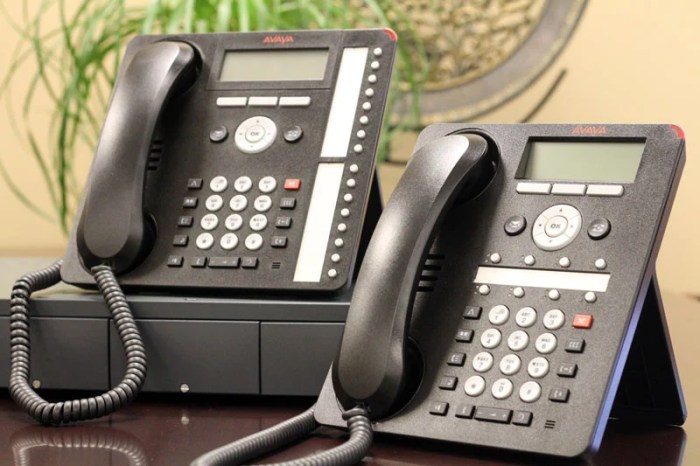
Choosing the right office telephone system hinges on understanding its features and how they align with your business needs. A modern system offers far more than just basic calling; it’s a communication hub impacting productivity and collaboration. The features available vary significantly depending on the system’s complexity and price point.
Essential features of a modern office telephone system include basic call handling (making and receiving calls, transferring calls, voicemail), call routing (directing calls to specific extensions or departments), and potentially integration with other business tools like CRM systems. However, advanced systems offer much more sophisticated capabilities.
Basic versus Advanced Features
Basic features focus on the fundamental aspects of communication, providing a functional yet simple solution. These usually include features like call forwarding, caller ID, voicemail, and basic call conferencing. Advanced features, on the other hand, significantly enhance efficiency and collaboration. They often incorporate unified communications (UC), allowing for seamless integration of voice, video, messaging, and presence information across various devices.
Examples include auto-attendants, call recording, integration with CRM and other business applications, and advanced call queuing systems.
Features Enhancing Team Collaboration
Modern office phone systems play a crucial role in boosting team collaboration. Features like instant messaging, presence indicators (showing whether colleagues are available), and integrated video conferencing allow for quick and easy communication. Shared call handling, where calls can be routed to multiple team members, ensures no calls are missed, improving customer service. Furthermore, features like call recording for training purposes and advanced call analytics can help identify areas for improvement in team workflows.
Feature Comparison Across Price Points
| Feature | Basic System (<$50/user/month) | Mid-Range System ($50-$150/user/month) | Advanced System (>$150/user/month) |
|---|---|---|---|
| Call Forwarding | Yes | Yes | Yes |
| Voicemail | Yes | Yes, with transcription | Yes, with transcription and visual voicemail |
| Call Conferencing | Basic | Advanced, with multiple participant options | Advanced, with screen sharing and recording |
| Unified Communications (UC) | No | Partial Integration (e.g., IM) | Full Integration (voice, video, chat, presence) |
| Auto-Attendant | No | Yes, basic | Yes, highly customizable |
| Call Recording | No | Optional Add-on | Standard Feature |
| CRM Integration | No | Optional Add-on | Standard Feature |
Scalability and Integration
Choosing a phone system that can grow with your business is crucial for long-term efficiency and cost-effectiveness. A scalable system allows you to adapt to changing needs, adding users, features, and functionalities without requiring a complete system overhaul. This adaptability prevents costly disruptions and ensures your communication infrastructure remains optimized for your current and future operational requirements.The ability to seamlessly integrate your phone system with other business tools significantly enhances productivity and streamlines workflows.
Imagine a scenario where a sales call is automatically logged in your CRM, call recordings are instantly accessible, and team communication is centralized. This level of integration minimizes manual data entry, reduces errors, and provides valuable insights into customer interactions and operational efficiency.
System Scalability Examples
A scalable phone system offers various methods to accommodate growth. For instance, a cloud-based system can easily add new users with minimal administrative overhead. Simply assign new extensions and provide login credentials. As the business expands to new locations, the system can accommodate geographically dispersed teams through virtual extensions and unified communication features. Conversely, a traditional on-premises system might require purchasing additional hardware and potentially upgrading the entire system to handle increased call volume or user count, leading to significant upfront costs and downtime.
This highlights the flexibility and cost-effectiveness of cloud-based solutions for scalable growth.
Integration Benefits
Seamless integration with Customer Relationship Management (CRM) systems like Salesforce or HubSpot provides significant advantages. Incoming calls can be automatically identified and associated with existing customer records, providing agents with immediate access to relevant customer information. This personalized approach enhances customer service and increases sales conversion rates. Integration with other tools such as help desk software or project management platforms further streamlines workflows, improving team collaboration and responsiveness.
The consolidated data from integrated systems also offers valuable business intelligence, allowing companies to analyze call patterns, identify areas for improvement, and make data-driven decisions to optimize operations.
Integration Considerations for Different Business Sizes
The importance of integration varies based on business size and complexity. Consider these factors:
- Small Businesses (1-10 employees): Prioritize CRM integration for efficient customer management and basic calendar syncing for scheduling. Focus on ease of use and affordability.
- Medium Businesses (11-50 employees): Consider integrating with CRM, help desk, and potentially project management software. Prioritize features that enhance team collaboration and reporting capabilities.
- Large Enterprises (50+ employees): Integrate with a wide range of business applications, including CRM, ERP, help desk, and other specialized software. Focus on robust reporting, analytics, and scalability to support a large and complex organizational structure. Security and compliance considerations become paramount.
Cost and Return on Investment (ROI)
Choosing an office telephone system involves a significant financial commitment. Understanding the various cost components and calculating the potential return on investment (ROI) is crucial for making an informed decision that aligns with your budget and business goals. This section will break down the costs associated with different system options and provide a framework for evaluating their long-term value.
Cost Components of an Office Telephone System
The total cost of ownership for an office telephone system encompasses several key areas. A thorough understanding of these components is essential for accurate budgeting and comparison shopping. Ignoring any of these factors can lead to unforeseen expenses and a skewed perception of the system’s true cost.
- Hardware Costs: This includes the cost of phones (desk phones, cordless phones, softphones), any required on-premise servers or hardware, cabling, and installation. The price varies greatly depending on the number of phones, features, and the brand chosen. For example, a system with 10 basic desk phones might cost significantly less than a system with 50 advanced IP phones and a sophisticated call center solution.
- Software Costs: This covers the cost of the telephone system software itself (including licensing fees), any integrated communication platforms (e.g., unified communications software), and any required software updates or maintenance agreements. Cloud-based systems often involve recurring subscription fees, while on-premise systems may have higher upfront costs but potentially lower ongoing expenses.
- Maintenance Costs: This includes costs associated with ongoing maintenance, repairs, and technical support. Cloud-based systems often include maintenance as part of the subscription fee, while on-premise systems require separate maintenance contracts or internal IT support. Factors such as the system’s complexity and the provider’s service level agreement (SLA) will influence these costs.
- Installation Costs: Professional installation is often necessary, especially for complex systems. The cost varies based on the system’s size, complexity, and location. Installation may include cabling, configuration, and user training.
- Training Costs: Employee training on how to use the new system is crucial for maximizing its effectiveness. This can include instructor-led training, online tutorials, or self-paced learning materials. The cost depends on the size of your team and the complexity of the system.
Calculating ROI for Different System Options
Calculating the ROI of a telephone system requires comparing the total cost of ownership against the anticipated benefits. This involves estimating the potential cost savings and increased productivity resulting from the new system.
ROI = (Net Profit / Total Investment) x 100
For example, consider two scenarios:* Scenario A: An on-premise system with a high upfront cost ($10,000) but lower ongoing maintenance ($500/year). Assume annual cost savings from increased efficiency are $2,000. Over five years, the net profit would be ($2,000/year x 5 years)$10,000 – ($500/year x 5 years) = $4,500. The ROI would be ($4,500 / $10,000) x 100 = 45%.* Scenario B: A cloud-based system with lower upfront costs ($2,000) but higher recurring monthly fees ($250/month or $3,000/year).
Assuming the same $2,000 annual cost savings, the net profit over five years would be ($2,000/year x 5 years)$2,000 – ($3,000/year x 5 years) = $7,000. The ROI would be ($7,000 / $2,000) x 100 = 350%.
Cost-Saving Measures
Several strategies can help minimize the overall cost of an office telephone system. Careful planning and consideration of these measures can significantly impact the total cost of ownership.
- Negotiate with Vendors: Obtain quotes from multiple vendors and negotiate prices for hardware, software, and maintenance contracts. Bundled packages can often offer cost savings.
- Optimize System Features: Select only the features your business truly needs. Avoid paying for unnecessary functionalities that will not be utilized.
- Consider Cloud-Based Solutions: Cloud-based systems often eliminate the need for expensive on-premise hardware and IT support, potentially leading to lower upfront and ongoing costs.
- Implement BYOD Policies: Allowing employees to use their own devices (BYOD) can reduce the number of phones the company needs to purchase and maintain.
- Invest in Employee Training: Proper training minimizes errors and maximizes the system’s efficiency, leading to long-term cost savings.
User Experience and Ease of Use
A user-friendly telephone system is crucial for boosting productivity and employee satisfaction. A poorly designed system can lead to frustration, wasted time, and ultimately, lost revenue. Therefore, prioritizing ease of use during the selection process is paramount. The system should seamlessly integrate into the workflow, empowering users rather than hindering them.Intuitive navigation and simple controls are essential for a positive user experience.
A complex interface will inevitably lead to errors and decreased efficiency. Users should be able to easily access the features they need without extensive training or troubleshooting. This includes straightforward call handling, voicemail management, and directory access. A well-designed system minimizes the learning curve, allowing employees to quickly become proficient.
User Interface Design Best Practices
Designing a user-friendly interface involves several key considerations. Firstly, the system should employ a clear and consistent visual design. This includes using easily recognizable icons, intuitive menus, and a logical layout. Secondly, the system should provide helpful prompts and guidance to users, particularly for less common functions. Thirdly, accessibility should be a priority, ensuring the system is usable by individuals with disabilities.
This might involve features such as screen reader compatibility and customizable font sizes. Finally, regular feedback mechanisms should be incorporated to identify areas for improvement and to gather user input. For instance, a simple survey after a significant system update could help identify usability issues before they become widespread problems.
Comparison of User Experiences Across System Types
Cloud-based telephone systems generally offer a more streamlined user experience compared to on-premises systems. Cloud solutions often feature user-friendly web interfaces and mobile applications, providing accessibility from anywhere with an internet connection. Updates and maintenance are handled by the provider, minimizing disruption for users. On-premises systems, while offering greater control, can be more complex to manage and may require more extensive training for users.
The user experience often depends heavily on the specific software and hardware configuration chosen. For example, a poorly configured on-premises system might present a more cumbersome interface than a well-designed cloud-based system. However, a carefully planned and well-maintained on-premises system can also provide a smooth and efficient user experience.
Positive User Experience Scenario
Imagine Sarah, a sales representative at a growing tech company. She uses a cloud-based phone system that integrates seamlessly with her CRM. With a single click, she can access a customer’s contact information and call history directly from her CRM. The intuitive interface allows her to easily manage calls, place them on hold, and transfer them to colleagues without any confusion.
Her voicemail is accessible through a mobile app, enabling her to stay connected even when away from her desk. The system’s reporting features provide her with valuable insights into her call volume and efficiency, empowering her to optimize her workflow. The entire experience is smooth, efficient, and enhances her productivity, ultimately contributing to her success and the company’s bottom line.
This scenario highlights the importance of a well-designed system that empowers users and improves their overall workflow.
Security and Reliability
A robust and reliable office telephone system is crucial for maintaining business operations and protecting sensitive information. Security breaches and system downtime can lead to significant financial losses, reputational damage, and disruption of workflows. Therefore, selecting a system with strong security features and high reliability is paramount. This section will explore key aspects of security and reliability to consider when choosing an office telephone system.
Data Encryption and Access Control
Data encryption and access control are fundamental security measures for any office telephone system. Encryption safeguards sensitive communications by converting them into an unreadable format, protecting them from unauthorized access during transmission and storage. Access control mechanisms, such as user authentication (passwords, multi-factor authentication), role-based permissions, and call detail record (CDR) management, limit access to system functionalities and data based on user roles and responsibilities.
For example, a system administrator might have full access, while a regular employee might only be able to make and receive calls. Strong encryption protocols, like TLS/SSL, and robust authentication methods are essential for protecting against unauthorized access and data breaches. Regular audits of user access permissions should be conducted to ensure they remain appropriate and up-to-date.
System Reliability and Uptime Measures
System reliability and uptime are critical for maintaining business continuity. Several factors contribute to system reliability, including redundancy (backup systems), disaster recovery planning, and regular maintenance. Redundant systems, such as backup servers and power supplies, ensure that the system continues to operate even if one component fails. A comprehensive disaster recovery plan Artikels procedures for restoring system functionality in the event of a major outage, such as a natural disaster or cyberattack.
Proactive maintenance, including regular software updates and hardware checks, helps prevent system failures and extends the lifespan of the equipment. Service Level Agreements (SLAs) with vendors guarantee a certain level of uptime and provide recourse in case of service disruptions. For instance, a 99.9% uptime SLA ensures minimal disruption to business operations.
Security Threats and Mitigation Strategies
Several security threats can compromise an office telephone system. These include phishing attacks (attempts to obtain sensitive information through deceptive emails or calls), denial-of-service (DoS) attacks (overwhelming the system with traffic to make it unavailable), and malware infections (introducing malicious software to gain unauthorized access). Mitigation strategies involve implementing firewalls to block unauthorized network access, employing intrusion detection and prevention systems to monitor network traffic for malicious activity, and regularly updating system software and firmware to patch security vulnerabilities.
Employee training on security best practices, such as recognizing phishing attempts and avoiding suspicious links, is also crucial. Regular security audits and penetration testing can identify and address potential vulnerabilities before they can be exploited. For example, simulating a phishing attack can highlight vulnerabilities in employee awareness and system security.
Electronic Telephone Systems
Choosing the right electronic telephone system is crucial for efficient communication and business operations. This section will compare and contrast various types, highlighting their advantages, disadvantages, and technological requirements. Understanding these differences will allow businesses to make informed decisions based on their specific needs and budget.
VoIP Systems
VoIP (Voice over Internet Protocol) systems transmit voice calls over the internet instead of traditional phone lines. This offers significant cost savings, especially for businesses with multiple locations or remote workers. VoIP systems are highly flexible and scalable, easily adapting to changing business needs. They often integrate seamlessly with other business applications, such as CRM and unified communications platforms.
PBX Systems
Private Branch Exchange (PBX) systems are traditional phone systems that manage internal and external calls within an organization. They can be either on-premises (hardware located within the business) or cloud-based (hosted by a third-party provider). PBX systems offer robust features such as call routing, voicemail, and conferencing, but they can be more expensive to install and maintain than VoIP systems, particularly on-premises solutions.
Cloud-based PBX systems offer many of the benefits of VoIP, including scalability and accessibility.
Comparison of VoIP and PBX Systems
The following table summarizes the key features and specifications of VoIP and PBX systems:
| Feature | VoIP | PBX (On-premises) | PBX (Cloud-based) |
|---|---|---|---|
| Cost | Generally lower initial cost, lower ongoing maintenance | Higher initial cost, higher ongoing maintenance | Moderate initial cost, moderate ongoing maintenance |
| Scalability | Highly scalable | Limited scalability, requires significant hardware upgrades | Highly scalable |
| Flexibility | Highly flexible, easily integrates with other applications | Less flexible, limited integration capabilities | Flexible, good integration capabilities |
| Reliability | Dependent on internet connection; potential for disruptions | Generally reliable, less susceptible to internet outages | Generally reliable, dependent on cloud provider’s infrastructure |
| Technological Infrastructure | Requires internet connection, VoIP-compatible phones or software | Requires dedicated phone lines, PBX hardware, and cabling | Requires internet connection, VoIP-compatible phones or software |
Technological Infrastructure Requirements
The technological infrastructure needed varies significantly depending on the system chosen. VoIP systems require a robust internet connection with sufficient bandwidth to support voice calls. They utilize IP addresses and routers for call routing. VoIP-compatible phones or softphones (software-based phones) are necessary. On-premises PBX systems require dedicated phone lines, a physical PBX unit, and extensive internal cabling.
Cloud-based PBX systems, like VoIP, rely on a stable internet connection and VoIP-compatible devices. However, the management and maintenance of the system are handled by the cloud provider.
Vendor Selection and Implementation
Choosing the right vendor and implementing a new telephone system effectively are crucial steps for maximizing the return on investment and ensuring a smooth transition. Careful consideration of various factors at each stage is essential for success. This section details key considerations for vendor selection, contract negotiation, implementation, and employee training.
Key Factors in Vendor Selection
Selecting a vendor involves assessing their capabilities, reputation, and alignment with your business needs. A thorough evaluation should consider factors beyond just price. Consider the vendor’s experience, the breadth of their offered solutions, their customer support structure, and their financial stability. Checking online reviews and seeking references from existing clients can provide valuable insights into a vendor’s performance and reliability.
The vendor should also be able to demonstrate a clear understanding of your business requirements and offer a tailored solution.
Best Practices for Negotiating Contracts and Service Level Agreements
Negotiating contracts requires a clear understanding of your needs and the vendor’s offerings. Start by clearly defining your requirements in a detailed request for proposal (RFP). This will help you compare vendors effectively and ensure the contract accurately reflects your expectations. Pay close attention to service level agreements (SLAs), which specify the vendor’s commitment to uptime, response times, and other performance metrics.
Negotiate for strong SLAs with clear consequences for non-compliance. Ensure the contract includes provisions for termination, upgrades, and support. It’s advisable to have legal counsel review the contract before signing.
Implementing a New Telephone System
Implementing a new telephone system involves several key steps. First, a thorough project plan should be developed outlining timelines, responsibilities, and milestones. This plan should include detailed steps for system configuration, network integration, and user provisioning. Next, the system should be installed and configured according to the specifications Artikeld in the contract. Thorough testing is crucial to ensure the system functions correctly before full deployment.
This may involve pilot testing with a small group of users before a company-wide rollout. Finally, any necessary hardware and software updates should be implemented.
Training Employees on a New Telephone System
Effective employee training is vital for ensuring a smooth transition and maximizing user adoption. The training program should be tailored to the specific features and functionalities of the new system. It should include both hands-on training and written documentation. Consider offering various training formats such as in-person sessions, online tutorials, and quick reference guides. Providing ongoing support and readily available resources is crucial for addressing any questions or challenges employees may encounter after the initial training.
Regular feedback sessions can help identify areas where additional training or support is needed.
Maintenance and Support
A robust office telephone system requires ongoing maintenance and support to ensure optimal performance, minimize downtime, and maximize its return on investment. Neglecting these aspects can lead to decreased productivity, frustrated employees, and ultimately, higher costs in the long run. Regular maintenance prevents minor issues from escalating into major problems, ensuring smooth communication flow within your organization.The importance of proactive maintenance cannot be overstated.
It’s akin to regular servicing of a vehicle – preventative measures are far more cost-effective than emergency repairs. A well-maintained system enjoys increased lifespan, better security, and enhanced user satisfaction.
Maintenance Options and Associated Costs
Several maintenance options exist, each with varying levels of coverage and associated costs. These options typically fall into tiered service agreements, offering different levels of support and response times.
- Basic Maintenance: This usually includes preventative maintenance checks, software updates, and basic troubleshooting support. Costs are generally lower but may involve higher charges for on-site visits or resolving more complex issues.
- Premium Maintenance: This offers more comprehensive coverage, including faster response times, priority support, and potentially on-site preventative maintenance visits. Costs are higher, reflecting the enhanced level of service and responsiveness.
- Full Service Agreements: These agreements often include all aspects of maintenance, including hardware replacement, software upgrades, and 24/7 support. They provide the highest level of protection but also come with the highest cost.
The specific costs associated with each option vary significantly depending on factors such as the size of the system, the number of users, the vendor, and the specific terms of the agreement. It’s crucial to carefully compare options and choose a plan that aligns with your budget and operational needs. For example, a small business might find a basic maintenance plan sufficient, while a large corporation with a critical reliance on its phone system might opt for a full-service agreement.
Common System Issues and Solutions
Several common issues can arise with office telephone systems. Addressing these promptly minimizes disruption and maintains efficient communication.
- Connectivity Problems: Issues such as poor internet connection or faulty cabling can disrupt calls. Solutions include checking network infrastructure, testing cabling, and contacting your internet service provider.
- Software Glitches: Software bugs or outdated firmware can lead to malfunctions. Regular software updates and patching are crucial to mitigate this. In some cases, a system reboot or factory reset might be necessary.
- Hardware Failures: Individual components, such as handsets, phones, or network devices, can fail. Solutions involve replacing the faulty component or contacting your vendor for repair or replacement under warranty.
- Security Breaches: Vulnerabilities in the system can expose it to security risks. Regular security audits, strong passwords, and up-to-date security software are crucial to prevent such issues.
Obtaining Technical Support from a Vendor
The process for obtaining technical support varies among vendors, but typically involves contacting their support team through phone, email, or online portals. Many vendors offer tiered support systems, prioritizing issues based on severity and the customer’s service agreement. Larger vendors may have dedicated support teams, while smaller vendors might provide support directly from their technical staff. It is essential to review the vendor’s support policies and procedures before committing to a system purchase to ensure they align with your business needs and expectations.
For example, some vendors may offer 24/7 support, while others may only provide support during business hours. A service level agreement (SLA) typically Artikels response times and resolution targets.
Selecting an office telephone system is a strategic investment impacting communication and productivity. By carefully considering features, scalability, cost, user experience, security, and vendor support, businesses can optimize their communication infrastructure. Remember that a well-chosen system not only facilitates efficient internal communication but also enhances external interactions with clients and partners, contributing significantly to overall business success. Investing time in thorough research and planning will yield long-term benefits and a system that empowers your team.
Question Bank
What is the difference between VoIP and PBX?
VoIP (Voice over Internet Protocol) uses the internet for calls, offering flexibility and cost savings. PBX (Private Branch Exchange) is a traditional phone system using dedicated lines, often offering more robust features but higher upfront costs.
How much should I budget for an office phone system?
Costs vary greatly depending on features, number of users, and system type. Expect a range from a few hundred dollars for basic systems to tens of thousands for advanced, multi-location setups.
What kind of maintenance is required?
Maintenance depends on the system. Cloud-based systems often require minimal maintenance, while on-premises systems may need regular updates and potential hardware repairs. Consider service contracts for ongoing support.
Can I integrate my phone system with my CRM?
Yes, many modern systems integrate seamlessly with CRM software, allowing for features like click-to-dial and call logging, improving sales and customer service efficiency.


